Assign Tags using the Afi2Go Wand
The Afi2Go Wand is a hand-held device for that is used to quickly identify the cow number and active tag ID and associate it to the correct animal.
To assign a tag using the Afi2Go Wand
-
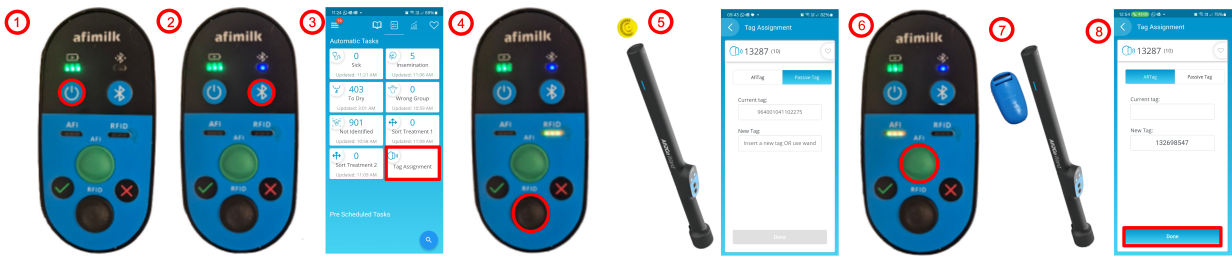
Press
 , then wait for the battery light to turn ON.
 -
Press
 to pair the device with your mobile phone.
The blue light flashes, until it's connected.
-
In Afi2Go Prime, open Tag Assignment.
-
On Afi2Go Wand, press RFID
 .
. -
Hold the tip of the Afi2Go Wand near the ISO RFID ear tag.
The Afi2Go Wand reads the tag, the cow card opens, the RFID light turns green, and the RFID # is displayed in the app.
-
On the Afi2Go Wand, press AFI
 .
.The AFI light flashes yellow.
-
Hold the blue line of the Afi2Go Wand as close as possible to the AfiTag.
The AFI light turns green and the AfiTag ID Number is displayed on Afi2Go Prime.
-
Press Done.
Note: If the Afi2Go Wand cannot read the tag, it times out automatically after 10 seconds and the LED turns from yellow (flashing) to red, and produces three beeps. This is true for both the RFID and AFI scans.
